Unified pricing rules: how to set floors without losing fill
Pricing rules decide the lowest price an ad may sell for in your Ad Manager network. How Google applies them, why the floor is compared with your share and not the buyer's bid, which rule wins when two overlap, and the first floor we would set.
On this page
- What we saw
- How pricing rules work
- Floor or target CPM?
- How to choose a first floor
- Mistakes we see
- Floors that change by themselves
- How VisionForgeX handles this
- Frequently asked questions
- What are unified pricing rules in Google Ad Manager?
- What happens when two pricing rules overlap?
- Is a target CPM the same as a floor?
- How many pricing rules can I create?
- Can I change pricing rules through the Ad Manager API?
Unified pricing rules are the floors of your Google Ad Manager network: each rule names some inventory and the lowest price an ad may sell for there. They apply to Ad Exchange, Open Bidding, header bidding and remnant line items, and the price is compared with your share of the bid, not the buyer's full bid. Set well, a floor raises what each impression earns; set badly, it turns away buyers who would have paid and leaves the slot empty.
This guide covers how Google applies the rules, which one wins when two overlap, the difference between a floor and a target CPM, and how we choose a first floor. It is for publishers who manage their own Ad Manager network, and for anyone reading floor advice and wanting to check it.
What we saw
We built a tool that suggests floors, called the Floor advisor, and the first thing it taught us was how easy it is to read a floor wrongly.
A rule type you cannot see in reports. Ad Manager lets each rule either set a floor price or a target CPM, and the reports do not say which one a rule is. Our advisor suggests hard floors, so on 1 Nov 2026 we added a question when someone marks a floor as made in Ad Manager: is it a floor price or a target CPM? A target CPM rule is now labelled as not being a floor, because its results mean something else, and judging it as a floor gives the wrong answer.
A floor that showed "0 days measured" for two days. Ad Manager reports days in the network's own time zone. Our first version counted a floor's first day in UTC and read the reports once a night, so in a network on US time a floor that went live on 1 November still showed no data on the 3rd. We fixed it on 4 Nov by following the network's time zone and reading again as soon as a newer day has finished. The lesson for anyone checking a floor by hand: compare whole days in the network's time zone, and do not judge a floor on a day that has not finished. Our article on Ad Manager's reporting delay explains why a fresh day always looks low.
No API for pricing rules. On 10 Nov 2026 we checked both of Google's Ad Manager APIs: neither can create, read or change a pricing rule. Everything that moves floors automatically therefore works the other way round: a fixed rule targets a key-value, and the page sends a different value when the floor should change. More on that in the last section.
How pricing rules work
Google's pricing rules page lists what a rule covers: the Open Auction, Private Auctions, First Look, third-party exchanges in Open Bidding, header bidding, SDK bidding, AdSense backfill and certain remnant line items. It does not cover Programmatic Direct, and Price Priority, Network and Bulk line items must meet the rule price to compete. House line items and CPD line items are not affected.
Four facts decide almost every result:
| Fact | What it means for you |
|---|---|
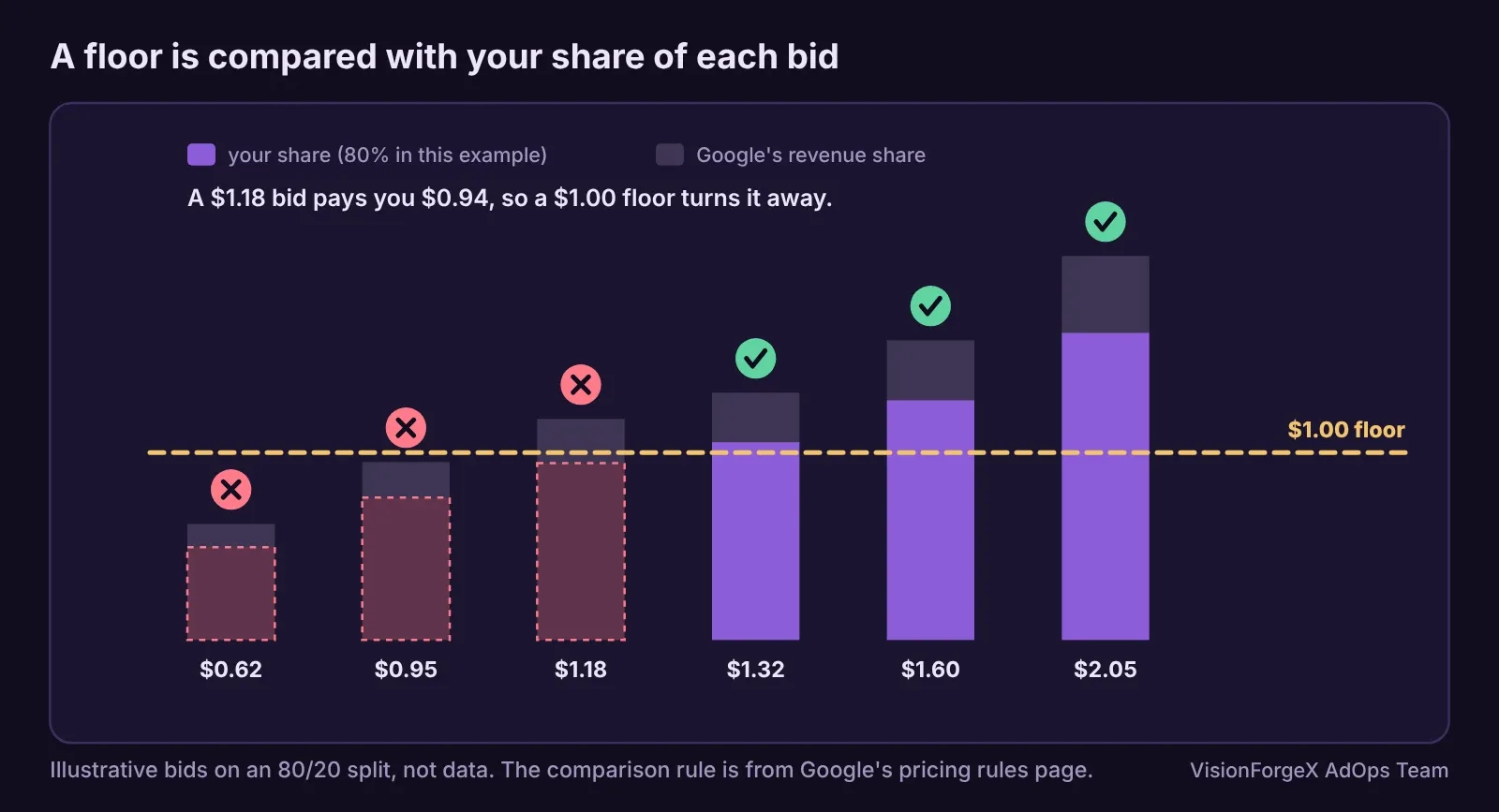
| The floor is compared with your share | On an 80/20 split, a 1.00 dollar bid is worth 0.80 to you, so a 1.00 floor turns it away |
| Overlapping rules: the higher price wins | Two rules on the same impression do not average; the stricter one applies |
| Inside one rule: the higher of "everything" and "specific" wins | Keep the everything price below the specific prices, as Google recommends |
| A network can have up to 200 rules | Floors by every country and size will not fit; group them |
The first fact surprises people most. A floor is not "bids under X are refused". It is "bids that would pay me less than X are refused".
Floor or target CPM?
When you create a rule, the pricing method defaults to target CPM. Google's target CPM page describes it as an average goal: Ad Manager sets a floor on each request, sometimes above and sometimes below your number, aiming for an average at or above the target. Its own example: a 2.00 dollar fixed floor fills one of two queries at 2.10; a 2.00 target CPM fills both, at 2.10 and 1.90, so the average falls 5% and revenue rises 95%.
Our view: neither is right for every rule. A fixed floor is predictable and easy to measure. A target CPM can earn more on mixed traffic, but individual impressions sell under your number and the result depends on Google's learning, which Google says may miss the target when a rule is new. Choose one per rule, write down which, and never compare a target CPM's eCPM with a floor's as if they meant the same thing.
How to choose a first floor
The safest first floor comes from the bids you already receive. Ad Manager has a Bid range dimension in historical reports, "the range within which the bid falls, divided into 0.10 dollar buckets", listed in its report dimensions. Run it with the Bids metric for one site, country and device, over the last 28 days, and you see how many bids landed in each 10-cent band. A floor in the middle of the bids turns away everything below it; a floor at the bottom turns away almost nothing.
This script reads such a report, exported as rows of range and bids, and says what share of bids a candidate floor would turn away. It converts the floor into the bid it means, so the comparison is made on your share, as Google makes it:
// Share of bids a floor would turn away, from Ad Manager's "Bid range" report (0.10 dollar buckets).
// rows: [{ range: '1.20 - 1.29', bids: 350 }, ...]
// share: what you keep of a bid (0.8 on an 80/20 split); set it to 1 if your report already shows your share.
function floorCut(rows, floor, share) {
  const bidFloor = floor / share;                // the bid that pays you exactly the floor
  let total = 0, cut = 0;
  for (const r of rows) {
    const low = parseFloat(String(r.range).replace(/[^0-9.]/g, ' ').trim().split(/\s+/)[0]);
    if (!isFinite(low) || !(r.bids >= 0)) continue;
    total += r.bids;
    if (low + 0.1 <= bidFloor + 1e-9) cut += r.bids;  // the whole bucket sits under the floor
  }
  return total ? { bidFloor: +bidFloor.toFixed(2), cutShare: cut / total, total } : null;
}
// floorCut(rows, 0.80, 0.8)  ->  { bidFloor: 1, cutShare: the share of bids under one dollar, total }
How to read it: if a floor turns away 40% of bids, the winning bids among the other 60% must be worth more than enough to pay for the empty slots, and on most traffic they are not. We start where the cut is small, around a tenth of bids, and move up only after a week of whole days shows the revenue per 1,000 ad requests going up and not just the eCPM. How to run that week as a fair test is a subject of its own, and the next two articles in this series cover it, with floors by country and device first.
We ran the function in a headless browser against sample rows: a bucket entirely under the floor is counted as cut, a bucket that straddles it is not, and a share of 0.8 moves a 0.80 floor to a 1.00 bid. It does not know whether your report shows full bids or your share, which is why the share is a parameter: check one known line item to find out before you trust the numbers.
What it does not do: it does not predict what buyers do next. Bids change when floors change, because some buyers bid against the floor. That is why the measurement afterwards matters more than the guess before.
Mistakes we see
- Reading eCPM alone. eCPM always rises when a floor turns away low bids. Revenue per 1,000 ad requests tells you whether the network earned more. Measure that.
- Judging after one or two days. A day is noisy, and the newest day is incomplete. Give a floor seven whole days in the network's time zone.
- A floor on every country and size. With a 200-rule limit and thin traffic per cell, most cells have too few bids to judge. Group countries with similar bids.
- An "everything" price above the specific prices. Inside one rule the higher price wins, so the specific prices never apply. Google's page recommends the opposite.
- Forgetting header bidding. Prebid bids that compete through Ad Manager line items meet the same rules. A floor set for Ad Exchange also shapes what your header bidding partners can win.
- Renaming a rule that a tool reads. If a tool finds a rule by its name, as ours does, a renamed rule disappears from its measurements.
Floors that change by themselves
Because no API can edit pricing rules, the only way to move floors automatically, by time of day or by country, is to make fixed rules that each target one value of a custom key, and let the page send the value it should have at that moment. Each rule then has one price that never changes; what changes is which rule matches. Two cautions from our own build: set such a key on your own ad slots, never page-wide, or every other ad tag on the page gets your floor too; and remember that rules overlap, so a general rule with a higher price beats your key-value rule.
How VisionForgeX handles this
Our Floor advisor reads the bid range report for each site, suggests a hard floor per country, device and size (or format), and after seven days says whether to raise, lower, remove or keep it, with the exact steps in Ad Manager. It never edits your rules: you, or our Ad Manager robot on networks that allow it, make them. For Ad Exchange basics, read how Google Ad Exchange works for publishers.
Frequently asked questions
What are unified pricing rules in Google Ad Manager?
They are the network's floors for non-guaranteed demand. Each rule targets some inventory and sets a price; Ad Exchange, Open Bidding, header bidding and remnant line items must pay at least that price, compared with your share of the bid. Google now calls them simply pricing rules.
What happens when two pricing rules overlap?
The higher price applies. Within a single rule, the higher of the "everything" price and the price for specific advertisers, brands or sizes applies.
Is a target CPM the same as a floor?
No. A target CPM is an average goal: Ad Manager sets per-request floors above and below it. A fixed floor is a minimum on every request. Their results are not comparable.
How many pricing rules can I create?
Google's help page gives a limit of 200 pricing rules per network.
Can I change pricing rules through the Ad Manager API?
When we checked on 10 Nov 2026, neither the SOAP nor the REST API could create, read or change pricing rules. Tools that change floors automatically target a key-value with fixed rules instead.
 Yield and revenue optimization
Floor prices by country and device: two ways that fit in Ad Manager
One floor for the whole world is too high in some countries and too low in others. Two ways to set floors by country and device in Google Ad Manager, how we fit them under the 200-rule limit, and a mistake we made with page-wide targeting.
 Yield and revenue optimization
How to test floor prices and read the result honestly
A floor change always seems to work if you read eCPM, and always seems to fail if you read fill. How to test floor prices properly, what Google's own experiments give you, how long to wait, and a small script that says when a result is real.
 Yield and revenue optimization
Ad refresh and Google's 30-second rule: what viewability changes
Google allows refreshing an ad no faster than every 30 seconds for time-based and event-based refresh, and wants you to declare it. Here is how it works, what we do in our own tag, and a timer that only refreshes ads people can see.