Floor prices by country and device: two ways that fit in Ad Manager
One floor for the whole world is too high in some countries and too low in others. Two ways to set floors by country and device in Google Ad Manager, how we fit them under the 200-rule limit, and a mistake we made with page-wide targeting.

On this page
- What we saw
- Why one floor is not enough
- Way one: a rule per country and device
- Way two: a ladder of rules and one key
- Mistakes we see
- How VisionForgeX handles this
- Frequently asked questions
- Can pricing rules target a country and a device?
- How many floors should I set by country?
- What is a floor price ladder?
- Should a floor key be set page-wide or per slot?
- Do floors by country replace the network floor?
Floor prices by country and device let each kind of visitor have a floor that suits the bids it really gets, instead of one number for the whole world. In Google Ad Manager there are two ways to do it: one pricing rule per country and device, or a small ladder of fixed rules that each target one value of a key, with the page choosing the value. The first is simpler; the second fits under Google's rule limit and can change without anyone editing a rule.
This guide explains both, the limits that push you towards the second, and the mistake we made with the key. It assumes you know what a pricing rule is; if not, start with how unified pricing rules work.
What we saw
When we split our Floor advisor's suggestions by country and device, two things became obvious in the first week.
Most cells are too thin to judge. A site with visitors from eighty countries does not have eighty countries' worth of bids. A few country and device cells carry most of the ad requests, and every cell after them has fewer bids than the one before. A floor on a thin cell cannot be measured: one good or bad day moves the result more than the floor does. So our Floor schedule floors only the cells that together make up 85% of a site's requests, and leaves the rest with no floor of ours.
A page-wide key reaches other people's ads. The first version of our floor key set its value for the whole page. Page-wide targeting is sent with every ad request on the page, so on a page that also carries another company's ad tags, their requests would carry our floor value too, and our rules could match their impressions. We moved the key onto our own slots in tag 1.38.0. It was a small change in code and a large one in meaning: a floor is a decision about your own inventory only.
The ladder has to be fine. The advisor's price is rounded down to the nearest step of the ladder, so the gaps between steps decide how close the real floor gets to the measured one. The second version of our ladder has 24 steps.
Why one floor is not enough
Buyers bid on the person, not on the page. A visitor from one country on a desktop may draw bids several times higher than a visitor from another country on a phone, on the same article, at the same minute. Pick one floor for both and it is either too low to matter for the first or high enough to empty the slot for the second.
Two limits shape what you can do in Ad Manager. Google's pricing rules page allows up to 200 rules per network, and when two rules cover the same impression the higher price wins. Ten countries times three devices times four sizes is already 120 rules, before a second site.
Way one: a rule per country and device
In a rule's targeting you choose the inventory (a site's ad units) and narrow it, for example to one country and one device category. Give it a floor price. Name it so you can find it in reports later; we use a pattern like site-country-device-size, and we never rename one, because our reports find rules by name.
This is the right choice for a single site with a few important countries. It goes wrong when:
- you have many sites, and the 200 rules run out;
- a general rule with a higher price also covers the same impression, and silently wins;
- you want floors to move, by time of day or after a measurement, because every change is an edit by hand.
Way two: a ladder of rules and one key
Make a custom key, say fl, with one value per price step: 25, 30, 40, 50 and so on, in cents. Make one pricing rule per value: the rule targets your inventory and the key fl is that value, and its floor is that price. Twenty-four rules give you twenty-four prices, whatever the number of countries.
Then the page decides. For each slot, it looks up the floor for this visitor's country and device, rounds it down to a step of the ladder and sets the key on the slot. The rules never change again; the table on your server does.
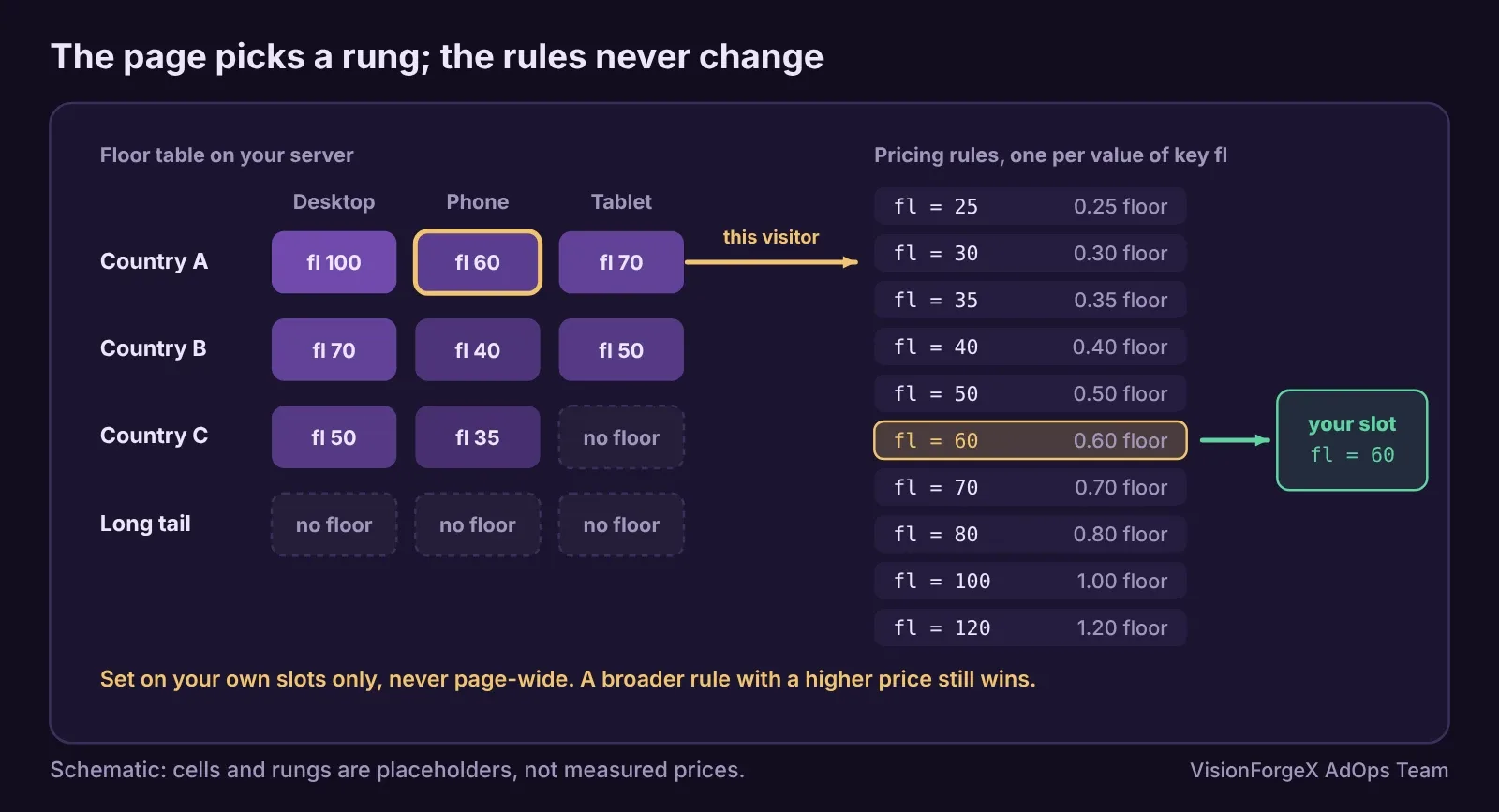
This is the code for the page side. The country comes from your server or your CDN (Cloudflare, for example, adds a CF-IPCountry request header that your server can put into the page); the browser cannot know it reliably by itself.
// Floors by country and device: the table comes from your server, the ladder matches your pricing rules.
const LADDER = [25, 30, 35, 40, 50, 60, 70, 80, 100, 120, 150, 200];   // cents, one pricing rule per value
const FLOORS = { 'US:desktop': 1.35, 'US:phone': 0.62, 'GB:phone': 0.48 };   // dollars, from your own measurements
function floorValue(country, device) {
  const want = FLOORS[country + ':' + device];
  if (!want) return null;                                // no floor of ours for a thin cell
  const cents = Math.floor(want * 100 + 1e-6);
  let step = null;
  for (const v of LADDER) if (v <= cents) step = v;       // round down: never above what you measured
  return step === null ? null : String(step);
}
function setFloors(slots, country, device) {
  const v = floorValue(country, device);
  for (const s of slots) {                                // our own slots only, never pubads().setTargeting
    if (v) s.setTargeting('fl', v); else s.clearTargeting('fl');
  }
  return v;
}
// googletag.cmd.push(() => setFloors(mySlots, window.VISITOR_COUNTRY, matchMedia('(max-width: 767px)').matches ? 'phone' : 'desktop'));
The numbers in FLOORS above are placeholders to show the shape; yours come from your own bid ranges and tests. How to check it worked: in the browser console run googletag.pubads().getSlots().map(s => [s.getSlotElementId(), s.getTargeting('fl')]) and each of your slots should show the step, while a slot defined by another tag should show nothing. In Ad Manager, a report by your key's values shows how much traffic each rung received.
We ran the two functions in a headless browser against stand-in slots: a 1.35 floor lands on the 1.20 step, a cell with no floor clears the key, the value never goes above the measured floor, and a slot that is not in the list keeps its own targeting. We have not run it against live Google ads.
What it does not do: it does not decide the floors. A wrong number in the table is a wrong floor on every page. It also does not stop a broader rule with a higher price from winning; check your other rules first.
Mistakes we see
- Page-wide floor keys.
pubads().setTargetingreaches every slot on the page, including other companies' ones. Set it per slot. This was our own mistake, and it is easy to make. - Flooring every cell. Thin cells cannot be measured and use up rules. Floor the cells with most requests.
- A ladder that rounds up. Rounding up turns a measured floor into a higher, unmeasured one. Round down.
- Phones decided by user agent alone. Device category in Ad Manager and your own phone test can disagree. Use the same rule everywhere, or read the device category back from your reports.
- Floors that never come down. A floor that turns away more than it adds should drop a step. Ours lowers such a floor one step for 28 days and says so by e-mail.
- Forgetting the report delay. Judging a new floor on today's partial numbers is judging noise; the reporting delay guide explains why.
How VisionForgeX handles this
Our Floor advisor suggests a floor per country, device and size or format for each site, and the Floor schedule turns the cells that carry 85% of the requests into a ladder of rules on one key, with the visitor's country added to the tag file by a Cloudflare Worker. The tag sets the key on our own slots only. Pricing rules still have to exist in your network: Google's API cannot make them, so they are made by hand or by our Ad Manager robot where a network allows it.
Frequently asked questions
Can pricing rules target a country and a device?
Yes. A rule targets inventory that you can narrow by geography and device category, among other options, and sets one price. Each combination you want is a rule, which is why the 200-rule limit matters.
How many floors should I set by country?
Only as many as you can measure. Start with the countries and devices that carry most of your ad requests, and leave the long tail without a floor until each cell has enough bids to judge in a week.
What is a floor price ladder?
A set of fixed pricing rules, each targeting one value of a key and holding one price. The page sends the value that matches the floor it wants, so floors change without editing rules.
Should a floor key be set page-wide or per slot?
Per slot. A page-wide key reaches every ad slot on the page, including other tags', and your rules would then apply to their impressions.
Do floors by country replace the network floor?
They sit beside it. Where two rules cover the same impression the higher price wins, so a network-wide rule with a higher price overrides your country floors.
 Yield and revenue optimization
Unified pricing rules: how to set floors without losing fill
Pricing rules decide the lowest price an ad may sell for in your Ad Manager network. How Google applies them, why the floor is compared with your share and not the buyer's bid, which rule wins when two overlap, and the first floor we would set.
 Yield and revenue optimization
How to test floor prices and read the result honestly
A floor change always seems to work if you read eCPM, and always seems to fail if you read fill. How to test floor prices properly, what Google's own experiments give you, how long to wait, and a small script that says when a result is real.
 Yield and revenue optimization
Ad refresh and Google's 30-second rule: what viewability changes
Google allows refreshing an ad no faster than every 30 seconds for time-based and event-based refresh, and wants you to declare it. Here is how it works, what we do in our own tag, and a timer that only refreshes ads people can see.