Infinite scroll ads: adding the next article without breaking rules
When the next article loads below the one being read, its ads are new impressions on content the reader asked for. How Google treats them, how to place the new slots, what to do with the address bar, and two problems we found on a real site.
On this page
- What we saw
- How Google treats ads in added articles
- The address bar and search engines
- The code: slots for an added article
- Mistakes we see
- How VisionForgeX handles this
- Frequently asked questions
- Are infinite scroll ads allowed by Google?
- Do I need to wait 30 seconds before ads in the next article?
- Should the URL change during infinite scroll?
- Does infinite scroll hurt SEO?
- How many ads should an added article have?
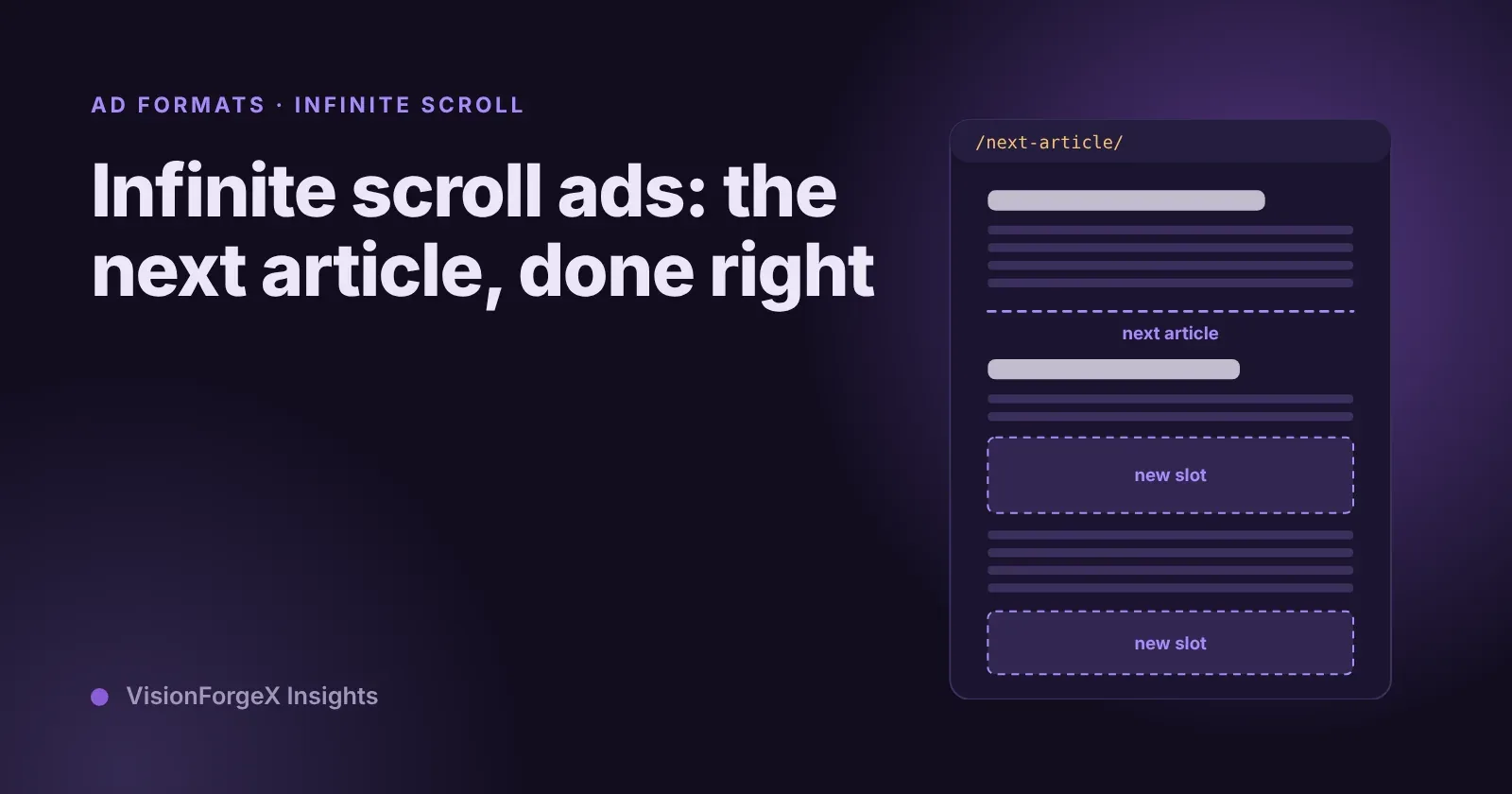
Infinite scroll ads are the ads that come with each new article a reader scrolls into, when the end of one article loads the next one below it. Done properly, they are new ad slots on new content the reader chose to read, which Google treats as user-action refresh, with no minimum interval. Done carelessly, they are the same page loaded again, or old slots re-requested as the reader scrolls, which is ordinary refresh with a 30-second minimum and a declaration duty.
This guide covers Google's rules, where the new slots go, what to do with the address bar, the two problems we found on a real site, and code for the ad part. It assumes you have read our guide to ad refresh and Google's 30-second rule, which this builds on.
What we saw
We built Next Read, our version of this, in early November 2026: at the end of an article, the next article of the same section is fetched and added below, with its own ad slots. Within a day of turning it on for a live Arabic-language education blog, the site taught us two things.
Not every page in the list is an article. The site's list held 30 pages; 7 of them were custom landing pages with their own layout and no article body. When the first pick was one of those, there was nothing to add, and the reader got our fallback, a plain card of links, although 23 of the 30 pages were normal posts. Since tag 1.33.1 we try up to three picks in order and fall back to the card only when all three fail.
The same address, written two ways. The site's sitemap wrote Arabic addresses with lower-case escapes (%d8); the browser writes them upper-case (%D8). Our code compared them as text, so it did not recognise the page being read, could offer it again, and could not find its section. Since 1.33.2 addresses are compared with the escapes in one case. Any site whose addresses contain non-Latin letters will meet this.
Two more decisions came from the start: added articles never appear for crawlers, link previews, pages inside a frame or readers with Data Saver on, and anything that goes wrong ends in the plain card, never in a broken page.
How Google treats ads in added articles
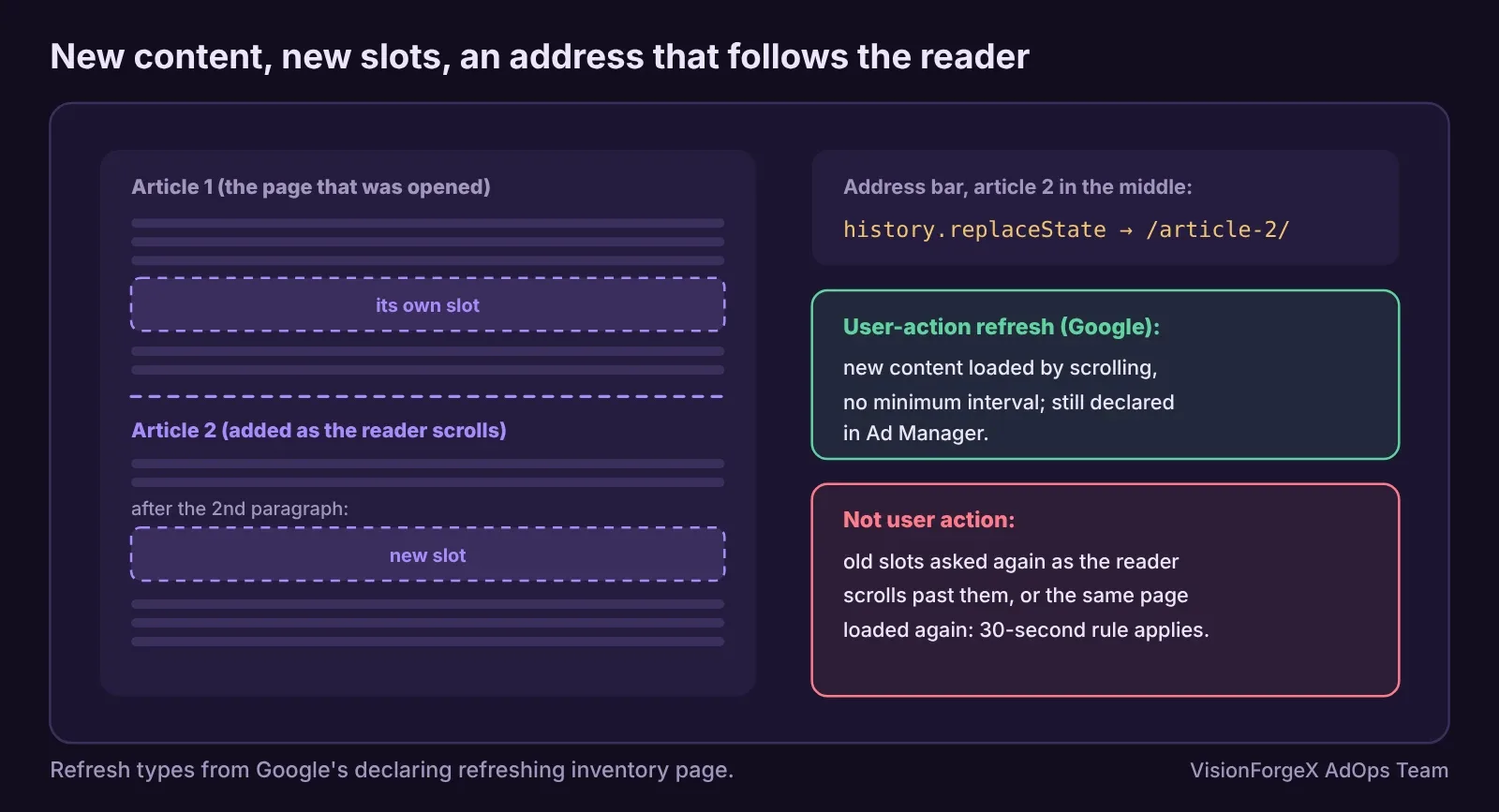
Google's page on declaring refreshing inventory names infinite scroll that loads new content as an example of user-action refresh, which has no minimum interval. It also says what does not count: scrolling that does not bring up substantially new content. Two consequences:
- Each added article should bring new ad slots, defined for that article, not old slots asked for a new ad as the reader scrolls past them. Asking old slots again is time-based or event-based refresh, with the 30-second minimum.
- You still declare refreshing inventory in Ad Manager, under Inventory rules, and choose the user-action trigger for the inventory where articles are added.
How many slots? Our rule: no more than the first article had, never before its second paragraph, and only after real paragraphs, the same rules our article text only setting uses to keep ads out of cards and tables. An added article that is denser with ads than a fresh page view of the same article would be is a page that exists for the ads.
The address bar and search engines
When the second article fills the screen, the address bar should show its address, so a reader who shares, bookmarks or reloads gets that article. The browser's history.replaceState changes the address without loading anything and without adding a step to the back button; we change the page title with it.
For search engines, Google's guidance on search-friendly infinite scroll comes down to one rule: every piece of content you add must also exist as an ordinary page, at its own address, reachable through normal links. Ours does by design, because we only add articles that are already pages of the site, taken from its sitemap.
The code: slots for an added article
This adds ad slots to an article that has just been inserted below the current one, after real paragraphs, and asks for their ads. Fetching and cleaning the article is a bigger job and depends on your site; here it is already in the page.
// New ad slots in an article added below the current one. Never before the 2nd paragraph, at most `max`.
let nextId = 0;
function addSlotsTo(article, position, opt = {}) {
  const every = opt.every || 4, max = opt.max || 3, path = opt.path || '/1234567/article';
  const paras = Array.from(article.querySelectorAll(':scope > p')).filter((p) => p.textContent.trim().length > 80);
  const slots = [];
  for (let i = 1; i < paras.length - 1 && slots.length < max; i += every) {   // after the 2nd paragraph, then every 4th
    const div = document.createElement('div');
    div.id = 'added-ad-' + (++nextId);
    paras[i].after(div);
    const slot = googletag.defineSlot(path, [[300, 250], [336, 280]], div.id);
    if (!slot) continue;
    slot.addService(googletag.pubads()).setTargeting('added', String(position));  // which added article it came with
    slots.push(slot);
  }
  slots.forEach((s) => googletag.display(s.getSlotElementId()));
  return slots;
}
// googletag.cmd.push(() => addSlotsTo(document.querySelector('#added-article-1'), 1));
The key added lets you report what the added articles earned separately, by the article's position; create it in Ad Manager first, as our key-values guide explains, or remove the line. If your page calls disableInitialLoad(), display() registers the slots but you must also call googletag.pubads().refresh(slots) to fetch them.
How to check it worked: scroll to the end of the first article; when the next one appears, googletag.pubads().getSlots().length should grow by the number of new slots, and each new slot's element should sit right after a paragraph.
We ran this code in a headless browser against a stand-in googletag and a sample article: slots go after the 2nd, 6th and 10th long paragraphs, never more than max, never after the last paragraph, short lines are skipped, each slot carries its position, and a second call gives new, unique ids. We have not run it against live Google ads.
What it does not do: it does not fetch, clean or insert the article, change the address bar, or declare anything in Ad Manager. It does not lazy-load the new slots; if you use lazy loading, the settings in our lazy loading guide apply to them too.
Mistakes we see
- Re-requesting old slots on scroll. That is refresh, with a 30-second minimum. Added content gets new slots.
- More ads in the added article than in a normal page view. Keep the density the same.
- A slot at the very top of the added article. It lands between two articles, where nobody is reading. Start after the second paragraph.
- No address change. A shared link points at the first article. Use
replaceState. - Adding pages that are not articles. Landing pages and lists have nothing to add. Check for an article body and move on to the next pick.
- Counting added articles as page views by accident, or not at all. Decide which, and tell your analytics; ours sends a
page_viewonly when the site asks for it.
How VisionForgeX handles this
Next Read is a per-site switch in our tag: the next article of the same section, newest first, never one already shown in the visit, up to three by default, cleaned of scripts, forms, old ads and comments, dressed in the site's own fonts and colours, with new slots after real paragraphs and the address following the article in view. Ads in added articles carry their position, so the revenue they add is reported on its own, and a comparison group can measure what it earns per visit, as in our revenue per visit guide.
Frequently asked questions
Are infinite scroll ads allowed by Google?
Yes, when each added piece is substantially new content. Google's refresh page names infinite scroll that loads new content as user-action refresh, with no minimum interval. You still declare refreshing inventory in Ad Manager.
Do I need to wait 30 seconds before ads in the next article?
Not for new slots in new content loaded by the reader's scrolling. The 30-second minimum applies to time-based and event-based refresh of existing slots.
Should the URL change during infinite scroll?
Yes. Change it to the article in view with history.replaceState, so shares, bookmarks and reloads point to the right article without adding steps to the back button.
Does infinite scroll hurt SEO?
Not if every added article is also an ordinary page at its own address, linked normally. Google's guidance is to make each piece reachable without scrolling.
How many ads should an added article have?
No more than the same article would have on its own page view. We place them after real paragraphs, never before the second one.
Read next
More on Ad formats and placements → Ad formats and placements
Ads inside cards, tables and headings: why it happens, how to stop it
Automatic ad placement loves a gap between two elements, and a card layout is full of gaps. Here is how we found ads inside cards on a real site, and the rules that keep them out.
 Ad formats and placements
Web interstitial ads: triggers, frequency caps and #google_vignette
A web interstitial is the full-screen ad Google shows when a reader moves between pages or comes back to a tab. Which triggers exist, how the frequency cap works, code that sets them, and why the address of your page suddenly ends in #google_vignette.
 Ad formats and placements
Rewarded ads for web: how they work, the rules, and the code
A rewarded ad on a website is one the reader chooses to watch in exchange for something you give them. What Google requires, what you have to build yourself, working Google Publisher Tag code, and the counting mistake we made.