Revenue per visit: which traffic sources really pay for themselves
Page RPM tells you what a page earns; revenue per visit tells you what a visitor from Facebook, search or a paid campaign earns across every page they read. How to measure it without inventing revenue, the counting mistake we made, and a script.

On this page
- What we saw
- How to measure revenue per visit
- The code
- Mistakes we see
- How VisionForgeX handles this
- Frequently asked questions
- What is revenue per visit?
- How is revenue per visit different from page RPM?
- How do I calculate revenue per visit without per-impression revenue?
- Why does my own revenue estimate exceed Google's?
- When does a visit end?
Revenue per visit is what one visitor earns you across every page they read in a visit, from the moment they arrive until they leave. It is the number to compare with the cost of a click: a campaign that sends visitors at 4 cents each pays for itself only if those visitors earn more than 4 cents a visit. Page RPM cannot answer that, because it does not know how many pages a visitor from each source reads.
This guide covers how to measure revenue per visit without inventing revenue, the counting mistake we made in our own tool, and a script that does the sums. It is for publishers who buy traffic, or who want to know which free sources are worth more effort.
What we saw
We built a revenue per visit report into our platform on 11 Nov 2026. Two days later it showed one site earning 272.40 dollars on 12 November. Google's own figure for that site and day was 78.41.
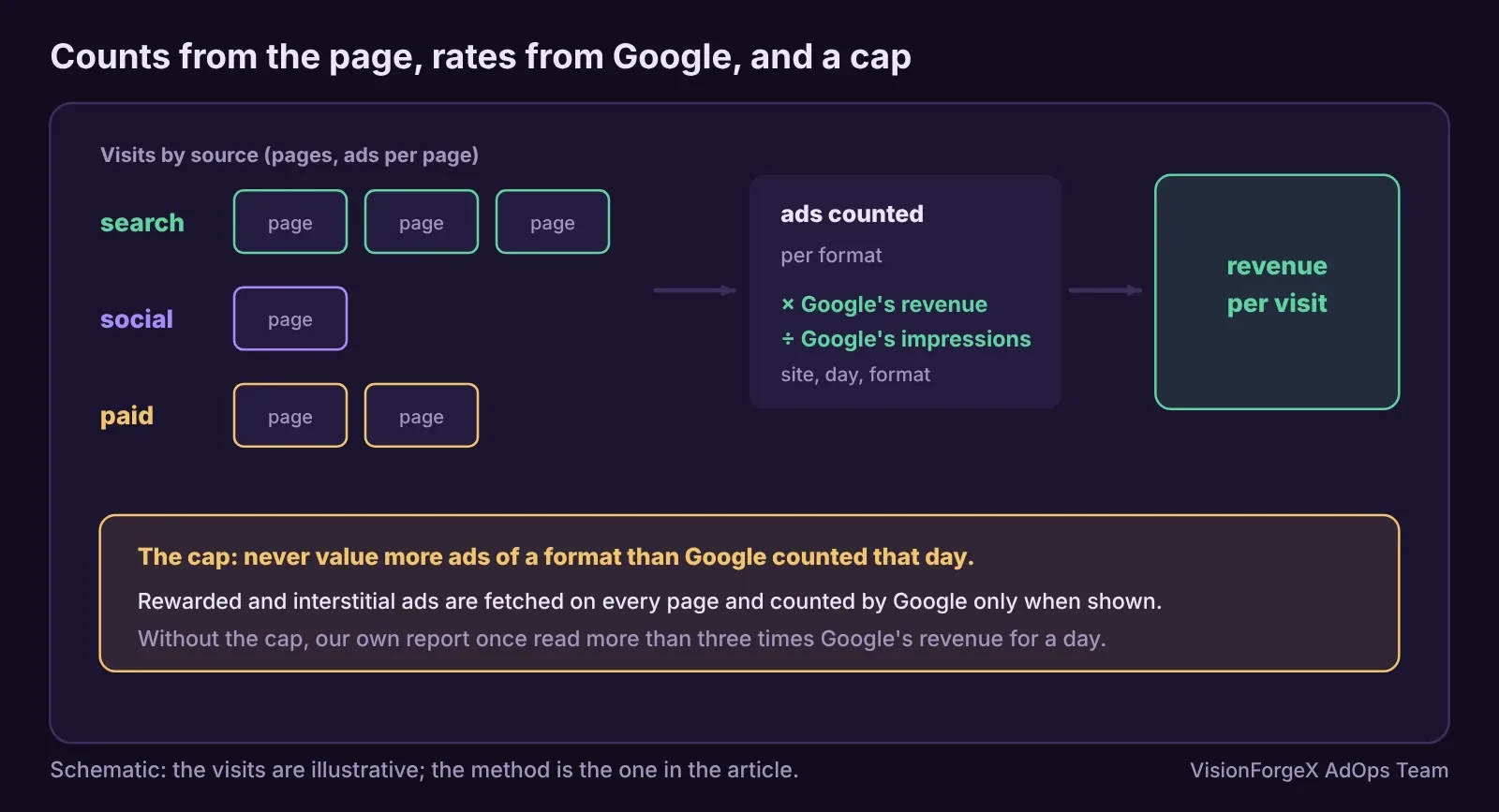
The site runs rewarded ads and web interstitials. Google's tag fetches both formats on every page and reports them as rendered at that moment, but Google counts an impression only when the reader actually sees the ad. Our report counted every fetched one: 31,292 ads against Google's 19,666 impressions. Valued at those formats' high rates, the extra ads more than tripled the day's revenue on paper.
We fixed it twice. On the platform, the report now never values more ads of a format than Google counted for that site and day. In the tag (1.47.0), a rewarded ad is counted when the call that shows it says it was shown, and an interstitial when Google shows it. The rewarded ads guide and the interstitial guide explain how.
The lesson goes beyond those two formats: a revenue figure you compute yourself must never be allowed to exceed what Google reports. If it does, your counting is wrong, not Google's.
How to measure revenue per visit
There are three parts, and only one of them is guesswork.
1. Where the visit came from. Read it on the first page of the visit: campaign tags (utm_source, utm_medium, utm_campaign), a click ID from an ad network (Google Ads adds gclid with auto-tagging, Microsoft Ads adds msclkid, Facebook adds fbclid), or failing those, the referrer. Keep the answer for the rest of the visit.
2. What the visit saw. Count the ads of each format shown on each page of the visit: banners, anchors, interstitials, rewarded, video. Nothing about the person, only counts.
3. What those ads earned. Here is the guess, so make it a small one. Google does not tell you what each impression earned, but it does tell you each format's revenue and impressions for a site and day. Their ratio is Google's own average revenue per impression for that format. Multiply your counts by it.
When does a visit end? We end it after 30 minutes without a page, as Google Analytics does by default according to its page on sessions, and we also start a new visit when a new campaign arrives. Google Analytics' page does not say it does the latter, so our visit counts can be a little higher than GA4's for campaign traffic.
The code
This script turns a day's visits and Google's figures for the same site and day into revenue per visit by source. It applies the cap that our own mistake taught us.
// visits: [{ source: 'facebook', ads: { banner: 6, rewarded: 1 } }, ...]   one site, one day
// google (example shape): { banner: { impressions: 81000, revenue: 97.2 }, rewarded: { impressions: 900, revenue: 18.0 } }
function revenuePerVisit(visits, google) {
  const counted = {};
  for (const v of visits) for (const f in v.ads) counted[f] = (counted[f] || 0) + v.ads[f];
  const value = {};                                   // what one counted ad of each format is worth
  for (const f in counted) {
    const g = google[f];
    if (!g || !g.impressions || !counted[f]) { value[f] = 0; continue; }    // no rate from Google: no revenue
    const rate = g.revenue / g.impressions;            // Google's own revenue per impression
    const fit = Math.min(1, g.impressions / counted[f]); // never value more ads than Google counted
    value[f] = rate * fit;
  }
  const by = {};
  for (const v of visits) {
    const s = (by[v.source] = by[v.source] || { visits: 0, revenue: 0 });
    s.visits++;
    for (const f in v.ads) s.revenue += v.ads[f] * value[f];
  }
  for (const s in by) by[s].perVisit = by[s].revenue / by[s].visits;
  return by;
}
Run it on yesterday or earlier, not today: the reporting delay leaves today's Google figures incomplete. And run it again when you read it next week, because Google's numbers for recent days are estimates that can still change. Our report stores the counts and works out the money each time the page is read, so a day Google corrects corrects itself.
We ran the function in a headless browser: when the counts match Google's, the total equals Google's revenue; when a format is over-counted three times, the total still equals Google's revenue for that format; a format Google has no figures for is valued at zero; and per-source results add up to the total. We have not compared it with a live Ad Manager account in this test.
What it does not do: it does not know that visitors from one source see better-paying ads than another; it values every banner of a site and day at the same average. Our platform weights by country and device for that reason. The result is an estimate, and a fair one only because it never adds up to more than Google paid.
Mistakes we see
- Comparing page RPM with cost per click. A visitor who reads five pages is worth five pages. Compare revenue per visit.
- Counting fetched ads. Rewarded and interstitial ads are fetched on every page. Count them when shown, or cap them at Google's count.
- A made-up rate. "Our CPM is about 3 dollars" is not a rate. Use Google's revenue divided by impressions for that format and day.
- Reading today. Today's revenue is partial. Use complete days.
- Mixing consent regions. Without consent to remember a visitor, in the EEA, UK and Switzerland, each page is its own visit in our report, by design, so pages per visit read 1 there.
- Forgetting the cost of the campaign itself. Revenue per visit minus cost per visit is the number you live on.
How VisionForgeX handles this
Traffic sources in our platform does all of this for each site that switches it on: sources and campaigns from the first page, ads per visit by format, money worked out when you read it from Google's own rates, never more than Google counted, and cost per click per campaign beside it, with profit and break-even. It is off for every site until switched on. If you buy traffic and want to know what it earns, ask us about it.
Frequently asked questions
What is revenue per visit?
The ad revenue one visitor brings across all the pages of a visit. It is the ad revenue for a set of visits divided by the number of visits.
How is revenue per visit different from page RPM?
Page RPM is revenue per 1,000 page views. Revenue per visit includes how many pages a visitor reads, which differs a lot by source, so it is the one to compare with what a visit costs.
How do I calculate revenue per visit without per-impression revenue?
Count the ads each visit saw by format, and value them at Google's revenue divided by impressions for that format, site and day, never more ads than Google counted.
Why does my own revenue estimate exceed Google's?
Usually because you count ads that were fetched but not shown, such as rewarded ads and interstitials. Cap each format at Google's impressions and count when shown.
When does a visit end?
In our report, after 30 minutes without a page view, or when a new campaign arrives. Google Analytics' default timeout is also 30 minutes of inactivity.
Read next
More on Publisher growth → Publisher growth
Layout shift from ads: how to measure it and read the number
Your page's layout shift score mixes everything that moved. This guide separates what the ads caused, shows a script that does it in your browser, and says what the number means.
 Yield and revenue optimization
How to test floor prices and read the result honestly
A floor change always seems to work if you read eCPM, and always seems to fail if you read fill. How to test floor prices properly, what Google's own experiments give you, how long to wait, and a small script that says when a result is real.
 Programmatic basics
PPID in Google Ad Manager: a first-party ID done carefully
The publisher provided identifier lets you send Google your own ID for a reader, so frequency caps and audiences work without third-party cookies. What Google requires, who sees it, the consent rules we follow, and code that sets it only when it should.