Web interstitial ads: triggers, frequency caps and #google_vignette
A web interstitial is the full-screen ad Google shows when a reader moves between pages or comes back to a tab. Which triggers exist, how the frequency cap works, code that sets them, and why the address of your page suddenly ends in #google_vignette.

On this page
- What we saw
- When Google shows an interstitial
- The code
- Mistakes we see
- How VisionForgeX handles this
- Frequently asked questions
- What does #google_vignette mean in my URL?
- How often can a web interstitial show?
- Can I choose when the interstitial appears?
- Why did defineOutOfPageSlot return null for my interstitial?
- Do web interstitials need consent?
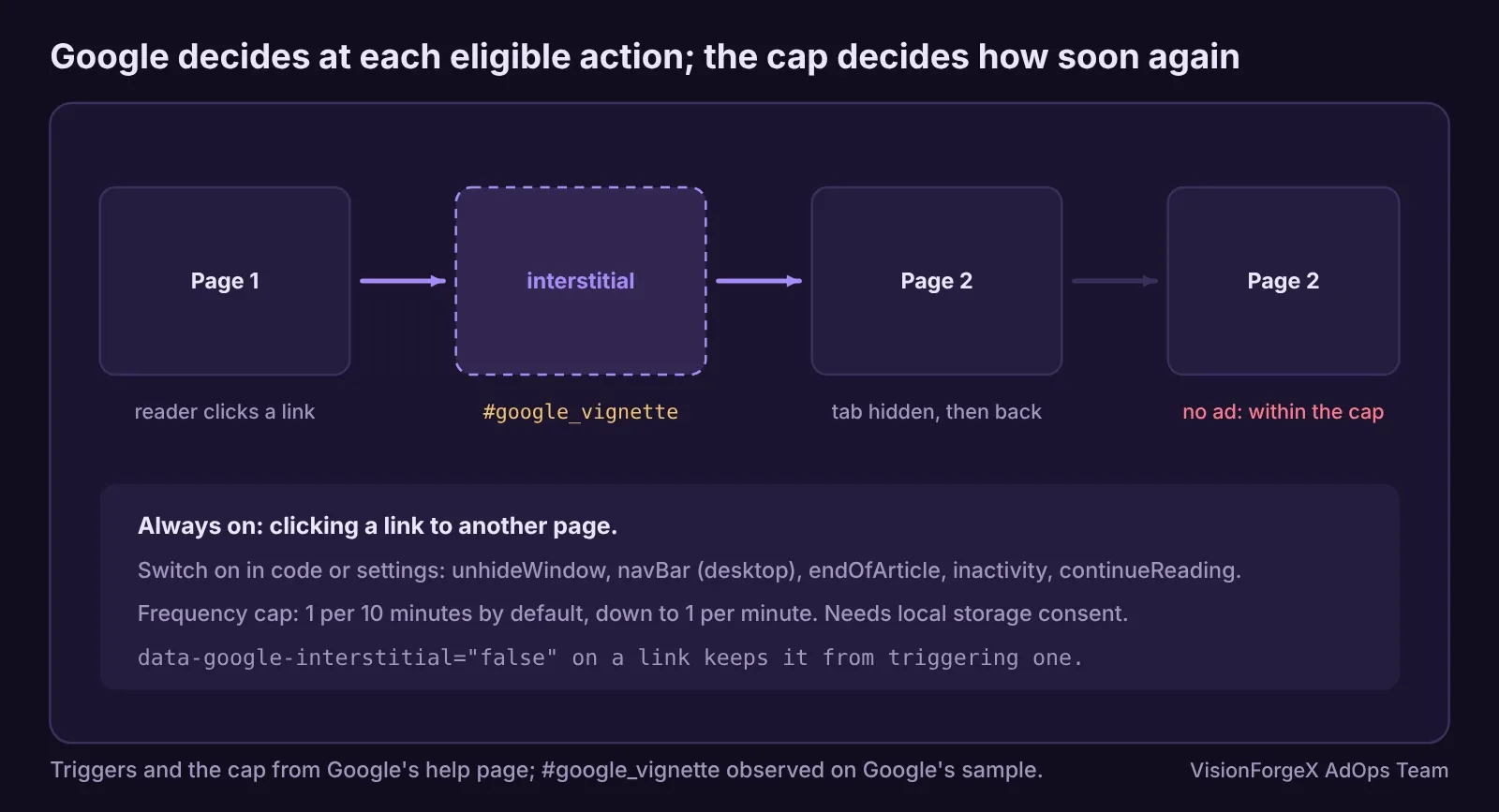
Web interstitial ads are full-screen ads that Google's Publisher Tag shows between two moments of reading: when a reader clicks a link to another page of your site, comes back to your tab, or, if you allow it, reaches the end of an article. You do not choose the moment; you choose which reader actions may trigger one, and Google decides whether to show an ad, limited by a frequency cap. When it does, the page's address gains #google_vignette until the ad closes.
This guide covers the triggers, the cap, the consent requirement, working code, and how to count interstitials honestly. It follows our guide to rewarded ads for web, the other format that covers the whole screen.
What we saw
Three things from running interstitials in our own tag.
A trigger name that did not exist. Ad Manager's settings offer a "Continue" trigger. Our tag first passed it to Google as continueButton, and Google's own Publisher Console flagged that as an unrecognized property. We took it out of the code and switch the trigger on in Ad Manager's network settings instead, which works for every page. Google's reference now lists the trigger as continueReading; we have not tested that name in our tag yet, so treat it as documented but unverified by us.
Rendered at page load, shown much later. An interstitial is fetched when the page loads and Google reports it as rendered then, long before the reader clicks anything. We proved this on Google's own sample page on 13 Nov 2026: the slot's render event fired at page load with an ad in it, and the ad appeared only after a link was clicked. Counting at render inflated our numbers, as described in the rewarded guide.
The address tells you when it is shown. On the same sample page, when Google showed the interstitial, the address changed to end in #google_vignette. Since tag 1.47.0 our tag counts an interstitial at that moment. Google does not document this, so our platform never relies on it alone: its reports scale our counts to Google's own impression figures.
When Google shows an interstitial
Google's web interstitials page lists the actions that can trigger one:
| Trigger | Name in code | Default |
|---|---|---|
| Clicking a link to another page | (not configurable) | Always on |
| Coming back to a hidden tab or window | unhideWindow | Off |
| Clicking the browser's navigation bar (desktop only) | navBar | Off |
| Reaching the end of the article, then scrolling back up or waiting | endOfArticle | Off |
| 30 seconds without activity, then an interaction | inactivity | Off |
| Clicking a "Continue" button | continueReading (by the reference) | Off |
Some details from the same page and the developer sample: links that open a new window, or that are not ordinary web links, do not trigger an ad; adding data-google-interstitial="false" to a link (or a parent element) keeps it from triggering one; and even after an eligible action, Google "may not show an interstitial".
The frequency cap defaults to one interstitial every 10 minutes, and you can set it at the network or ad unit level down to one a minute. The cap is kept in the reader's local storage, which is why interstitials need storage consent: for sites using IAB TCF v2.2, purpose 1. Setting requireStorageAccess: true makes Google skip readers who have not given it.
The code
This defines an interstitial with the triggers you choose and keeps your own count of interstitials shown. Replace the ad unit path with yours.
// A web interstitial with chosen triggers. Google decides when to show it; we only count when it is shown.
let iShown = 0, iReady = false;
googletag.cmd.push(() => {
  const slot = googletag.defineOutOfPageSlot('/1234567/interstitial', googletag.enums.OutOfPageFormat.INTERSTITIAL);
  if (!slot) return;                                  // the page cannot show one (not the top window, for example)
  slot.addService(googletag.pubads());
  slot.setConfig({
    interstitial: {
      triggers: { unhideWindow: true, navBar: true }, // link clicks are always on and cannot be switched off here
      requireStorageAccess: true                      // skip readers who did not allow local storage
    }
  });
  googletag.pubads().addEventListener('slotRenderEnded', (e) => {
    if (e.slot === slot && !e.isEmpty) iReady = true; // fetched and ready: not yet seen by anyone
  });
  googletag.enableServices();
  googletag.display(slot);
});
// Observed, not documented by Google: the address gains #google_vignette while the ad is on screen.
window.addEventListener('hashchange', () => {
  if (iReady && location.hash === '#google_vignette') { iShown++; iReady = false; }
});
How to check it worked: load a page, click a link to another page of the site, and the ad should appear before the next page, with #google_vignette in the address. To see it on demand, Google's page describes a demo parameter in the address that forces the format; use it on a test page only.
We ran this code in a headless browser against a stand-in googletag: the triggers and requireStorageAccess reach setConfig as written, a render does not count as shown, the count goes up once when the address changes to #google_vignette, an empty render does not arm it, and a null slot does nothing. We have not run it against live Google ads, and the #google_vignette behaviour comes from what we saw on Google's sample, so it could change without notice.
What it does not do: it does not set the frequency cap, which lives in Ad Manager's settings; it does not make the ad appear on demand; and it does not stop Google from skipping a trigger.
Mistakes we see
- Treating #google_vignette as a broken page. It is the interstitial. Analytics that record the address as a new page view should ignore it.
- Counting at render. The ad is fetched at page load and may never be shown. Count when it is shown, or rely on Google's impression figures.
- Every trigger on, cap at one minute. Readers notice a full-screen ad every minute. Start with link clicks and the default 10-minute cap, and measure revenue per page view before adding more, as our ad refresh guide does for refreshed ads.
- No consent handling. Without storage consent in the EEA, UK or Switzerland, the ad should not appear;
requireStorageAccessis the switch. - Using a removed trigger. Google's reference marked the
backwardtrigger for removal on 15 June 2026. Do not build on it. - Interstitials on pages that already struggle. A page with heavy layout shift from ads and a full-screen ad on top feels worse than either alone.
How VisionForgeX handles this
The interstitial is a per-site format in our tag, using Google's own triggers as chosen in the site's settings, with requireStorageAccess available, and the Continue trigger switched on in Ad Manager rather than in code. Our tag counts an interstitial when it is shown, and our reports never value more interstitials than Google counted that day. See how the formats fit together on our products page.
Frequently asked questions
What does #google_vignette mean in my URL?
It appears when Google's web interstitial ad is on screen. It is not a page of your site and not an error. Google does not document it on its interstitial page; we observed it on Google's own sample.
How often can a web interstitial show?
By default, once every 10 minutes per reader. You can change the cap in Ad Manager down to once a minute, at the network or ad unit level.
Can I choose when the interstitial appears?
You choose which reader actions may trigger it. Google decides whether to show an ad at each one and may skip it.
Why did defineOutOfPageSlot return null for my interstitial?
Interstitials only work when Google's tag runs in the top window of the page, and Google says the call returns null on pages that do not support the format.
Do web interstitials need consent?
They use local storage for the frequency cap, so under IAB TCF v2.2 they need purpose 1 consent. requireStorageAccess makes Google skip readers without it.
Read next
More on Ad formats and placements → Ad formats and placements
Rewarded ads for web: how they work, the rules, and the code
A rewarded ad on a website is one the reader chooses to watch in exchange for something you give them. What Google requires, what you have to build yourself, working Google Publisher Tag code, and the counting mistake we made.
 Ad formats and placements
Ads inside cards, tables and headings: why it happens, how to stop it
Automatic ad placement loves a gap between two elements, and a card layout is full of gaps. Here is how we found ads inside cards on a real site, and the rules that keep them out.
 Programmatic basics
PPID in Google Ad Manager: a first-party ID done carefully
The publisher provided identifier lets you send Google your own ID for a reader, so frequency caps and audiences work without third-party cookies. What Google requires, who sees it, the consent rules we follow, and code that sets it only when it should.