Ads inside cards, tables and headings: why it happens, how to stop it
Automatic ad placement loves a gap between two elements, and a card layout is full of gaps. Here is how we found ads inside cards on a real site, and the rules that keep them out.
On this page
- What we saw
- Why it happens
- How to check your own page
- How to fix it
- Mistakes we see
- How VisionForgeX handles this
- Frequently asked questions
- Are ads inside cards against Google's policies?
- Should I put ads between every paragraph then?
- Does an ad directly under a heading do any harm?
- Can I do this without a plugin?
- What if the ad rule leaves a page with no ads?
- Where to go next
Ads inside cards are what you get when a script is told to "put an ad after every third block" on a theme where the page is built out of boxes. The script finds a gap between two elements, puts a slot there, and the gap turns out to be inside a card, a table row or a list of questions. Readers see an ad where a recipe step or a price should be, and they tap it by mistake or leave.
This guide shows what that looks like on a real page, why automatic placement does it, how to list every slot on a page and see what it sits inside, and the rules we ended up with. One of those rules was too strict at first, and we say so.
What we saw
On 5 November 2026 our placement checker made its first full visit to a real education site that we monitor. It is a headless browser that scrolls each page the way a reader does and records where every ad slot ended up. We are not naming the site, and its owner has the report.
The home page was the worst. Ads had landed inside the blocks of the card grid, in the middle of headings, and next to "Read more" links, so a reader reaching for a link had an ad under the thumb. One page jumped by a large amount as the slots opened, which the checker marks when the shift caused by ads passes 0.25 (Google's own line for a poor score on a whole page is the same number).
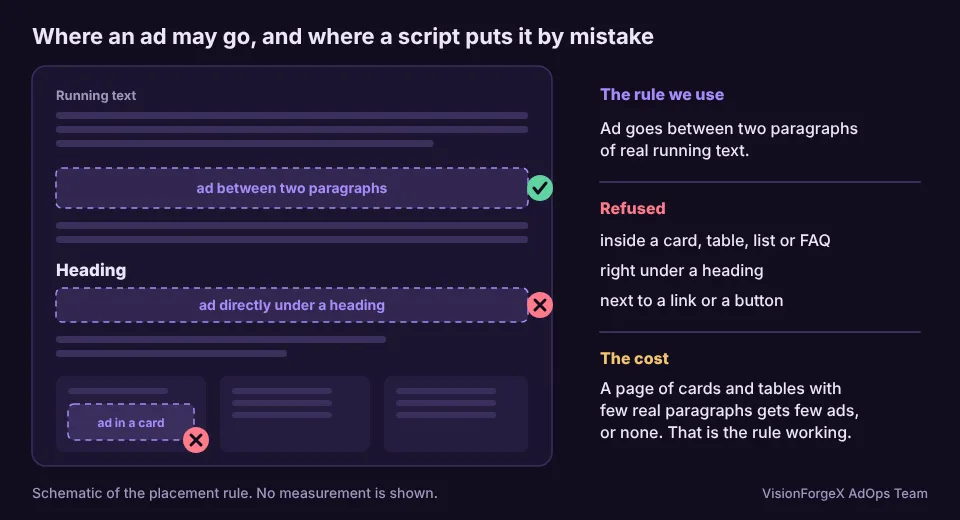
The fix was a setting on our tag called "Article text only". With it on, the tag places an ad only between two paragraphs of running text, and refuses any paragraph that sits inside a card, table, list or FAQ block, or directly under a heading. After the owner switched it on, we ran the checker again on six pages. None had a medium or high finding.
Then we found our own mistake.
That shipped in tag 1.32.0. Our own tests for the checker caught it, and tag 1.32.1 fixed it. An <article> now counts as a card only when it sits inside another article or beside other articles, as in a list of posts. A post page with its one article gets its ads. The two lessons: a strict rule needs a test for the pages it must still allow, and "fewer ads" is not automatically "safer". An ad-free page earns nothing.
Why it happens
A placement script has to answer one question: after which element does this slot go? The easy answers are all about structure, not meaning. "After every third <p>", "after the second <h2>", "after each <li>". Structure is what a script can see.
Page builders and themes use the same elements for different jobs. A card is often a <div> with a heading, a paragraph and a link. To the script that paragraph looks like any other. A pricing table is full of cells with short text. An FAQ is a list of headings and answers. Each of these has many gaps, and each gap is a legal place for a slot as far as the HTML goes.
Three patterns do most of the damage:
- Inside a repeated block. The ad lands between the title and the text of one card, so the grid looks broken and the ad looks like part of the content. Policy-wise this is the worst case, because the ad is mistaken for content.
- Beside a link or button. An ad next to "Read more" or "Download" invites accidental taps. Google's publisher policies say Google-served ads may not sit next to navigation or other action items where they could cause unintended ad interactions, and a slot a thumb-width from a link is the usual cause.
- Between a heading and what it introduces. The reader cannot tell what the heading is about, because the first thing under it is an ad.
How to check your own page
Open a page that shows ads, open the browser console, and paste this. It lists each slot, whether it is inside a box, and what sits directly before and after it:
// Lists every Google Publisher Tag slot with the box it sits in and its neighbours.
const BOX = 'li, table, figure, blockquote, details, [class*="card"], [class*="faq"], [class*="accordion"]';
googletag.pubads().getSlots().forEach((slot) => {
  const el = document.getElementById(slot.getSlotElementId());
  if (!el) return;
  const box = el.parentElement && el.parentElement.closest(BOX);
  const prev = el.previousElementSibling;
  const next = el.nextElementSibling;
  console.log(slot.getSlotElementId(), {
    insideBox: box ? box.tagName.toLowerCase() + (box.className ? '.' + String(box.className).split(' ')[0] : '') : null,
    after: prev ? prev.tagName.toLowerCase() : null,
    before: next ? next.tagName.toLowerCase() : null,
  });
});
Read the result like this. insideBox: null is what you want. A value such as div.card or li is a slot to move. after: 'h2' means the ad sits right under a heading, and before: 'a' means a link is the very next thing a thumb can reach.
The snippet needs googletag to be loaded, so it only works once the page has the Google tag on it. getSlots() is documented in Google's Publisher Tag reference. We ran this one against a stand-in googletag in a headless browser while preparing this article. The BOX selector is a guess at common class names, so add your theme's own card class to it. It also tells you nothing about slots that were never filled, which is a different problem.
How to fix it
You have three options, in order of how much we like them.
1. Fix it where the slots are defined. If you place the slots yourself, put each one in a wrapper between two paragraphs and nowhere else. A fixed template is more boring than automatic placement and much safer.
2. Tell the script what a card is. Most placement tools can exclude selectors. Excluding your theme's card, table and FAQ classes costs ten minutes and removes the worst cases.
3. Use a rule, not a list. This is what "Article text only" does. A paragraph qualifies only if it is real running text (long enough to be prose, not a caption), its ancestors contain no card, table, list or FAQ, and the element before it is not a heading. Anything else is skipped. The page may end with fewer ads, and that is the point.
Mistakes we see
- Counting ads instead of looking. "Six ads on the home page" tells you nothing about where they are. Ask for the places.
- Excluding by one class name. The theme gets an update, the class changes, and the ads are back inside the cards. Rules based on what an element is (a repeated block, a table) last longer than rules based on what it is called.
- A rule with no pages it must allow. Ours did exactly this. When you add a refusal, also test a page that must still get its ads.
- Fixing the layout but not the links. An ad that is correctly placed but touches a button is still a policy problem.
- Checking once. Themes, plugins and page builders change. We run the check on a schedule for that reason.
How VisionForgeX handles this
The tag has an "Article text only" setting per site, off until you switch it on (see ForgeAI Placements). Separately, our placement checker visits every page of a site on a schedule and raises an alert when an ad ends up inside a card, beside a link, or under a heading. The cost is the one described above: a page made mostly of cards, tables and a question list with only a handful of real paragraphs can end up with none, or very few, ads. On the education site, one such page did. We consider that the correct result, but it is worth knowing before you switch the setting on.
If you do not use us, the console script above and ten minutes with a phone will find most of it.
Frequently asked questions
Are ads inside cards against Google's policies?
Not by that name. The policies ask that it is clear which publisher content an ad is associated with, and that ads do not sit where they cause unintended interactions. An ad inside a card can break both, depending on the card. Read the current wording in Google's publisher policies rather than relying on a summary, including ours.
Should I put ads between every paragraph then?
No. Spacing matters as much as position. Ads that follow each other closely hurt reading and, on many pages, viewability. We aim for text between ads that a reader finishes before seeing the next one.
Does an ad directly under a heading do any harm?
It breaks the link between the heading and its text, and readers who skim by headings land on an ad. It is not a policy breach by itself, but it is one of the findings that came up most on the page we checked.
Can I do this without a plugin?
Yes. Define the slots in your template between paragraphs, and use the console script above to check. Automatic placement is a convenience, not a requirement.
What if the ad rule leaves a page with no ads?
Then the page has no good place for them. Add real text, or accept a page without ads. A card grid does not become a good ad position because an ad fits in it.
Where to go next
If you run Google's demand through us, how Google Ad Exchange works for publishers explains where the ads come from. If you want to talk through a page that looks wrong, get in touch with the address and we will look at it.
Read next
More on Ad formats and placements → Ad formats and placements
Web interstitial ads: triggers, frequency caps and #google_vignette
A web interstitial is the full-screen ad Google shows when a reader moves between pages or comes back to a tab. Which triggers exist, how the frequency cap works, code that sets them, and why the address of your page suddenly ends in #google_vignette.
 Ad formats and placements
Rewarded ads for web: how they work, the rules, and the code
A rewarded ad on a website is one the reader chooses to watch in exchange for something you give them. What Google requires, what you have to build yourself, working Google Publisher Tag code, and the counting mistake we made.
 Publisher growth
Layout shift from ads: how to measure it and read the number
Your page's layout shift score mixes everything that moved. This guide separates what the ads caused, shows a script that does it in your browser, and says what the number means.