Layout shift from ads: how to measure it and read the number
Your page's layout shift score mixes everything that moved. This guide separates what the ads caused, shows a script that does it in your browser, and says what the number means.
On this page
- What we saw
- What the number means
- How to measure it
- How to fix it, in order
- Mistakes we see
- How VisionForgeX handles this
- Frequently asked questions
- What is a good layout shift score for a page with ads?
- Do ads that load below the fold hurt my score?
- Why is my lab score different from the score in Search Console?
- Does lazy loading ads reduce layout shift?
- Should I reserve space for refreshed ads too?
- Where to read next
Layout shift from ads is the part of your page's Cumulative Layout Shift (CLS) score that happens because an ad slot opened, grew or collapsed and pushed something the reader was looking at. Google's score does not say which element caused a shift, so on a page with ads you have to separate that part yourself. A short script in the browser does it, and this guide shows one, explains the number it gives you, and covers the fixes in the order that pays.
The script is for finding causes. Whether you fixed the problem is decided by real visits, and the last section says where to look for those.
What we saw
Our placement checker scrolls each page of a site in a headless browser, on a phone-sized and a desktop-sized window, and measures layout shift from the moment a slot appears. It does not request ads. A grey 300 by 250 box stands in for each slot, so the page lays out as if every slot were filled.
On a real education site we monitor, the first run on 5 November 2026 flagged one page with a large jump caused by ads, over the 0.25 line that Google calls poor. The owner then switched on an option that keeps ads out of cards and headings (the story is in our guide to ads inside cards and tables) and we ran the checker again.
The home page then looked like this:
| Device | Ads on the page | Total shift | Of which from ads |
|---|---|---|---|
| Phone | 6 | 0.16 | 0.12 |
| Desktop | 7 | 0.09 | 0.03 |
Two things stand out. The phone total is over the good line of 0.1, and three quarters of it is the ads. On desktop the page is fine, and the ads are a third of what little shift there is. The same page, the same slots, a different outcome, because a phone screen is narrow and each shift moves a larger share of what you see.
Be careful with these numbers. They come from the stand-in box, not from live creatives. A real ad can be smaller than 300 by 250, or larger, or absent. The figures tell us where the page is fragile. They do not say what readers saw that day.
What the number means
Google's guide to CLS defines each shift as the impact fraction times the distance fraction. The impact fraction is how much of the viewport the moving elements covered, before and after. The distance fraction is the largest distance anything moved, as a share of the viewport's larger side. Google's example: an element that covers 75% of the viewport and moves down by 25% of its height scores 0.75 times 0.25, about 0.19.
Three rules from the same guide matter for ads:
- A score of 0.1 or less is good, and above 0.25 is poor. It is judged at the 75th percentile of page loads, separately for mobile and desktop, so a quarter of your visits may be worse than the number.
- A shift within 500 milliseconds of a tap, click or key press does not count. An ad that opens because the reader tapped a menu is excused. One that opens while they scroll is not, because scrolling is not counted as input.
- Only things that move in view count. A slot below the fold that opens does not matter until it pushes visible content.
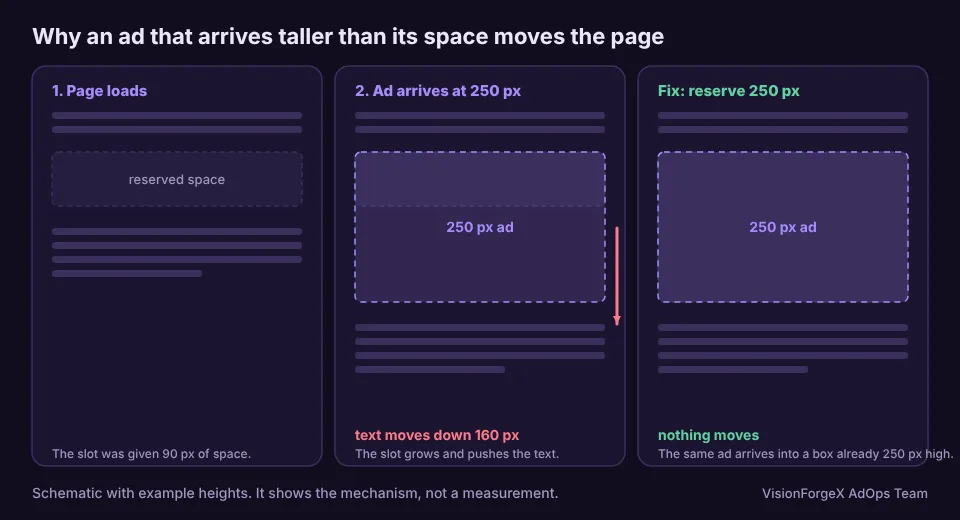
So the damage comes from one pattern: a slot that opens above or near the reader at a different height than the space that was set aside for it.
How to measure it
Paste this in the browser console as early as you can, ideally from a script in the page head, because it can only see render events that happen after it runs. It works out the score the way Google does, as the worst burst of shifts in the visit, and also how much of that burst happened near an ad render:
let win = { v: 0, ad: 0, first: 0, last: 0 }, worst = { v: 0, ad: 0 };
const renders = [];                                   // times when an ad slot finished rendering
googletag.cmd.push(() => {
  googletag.pubads().addEventListener('slotRenderEnded', () => renders.push(performance.now()));
});
new PerformanceObserver((list) => {
  for (const e of list.getEntries()) {
    if (e.hadRecentInput) continue;                   // shifts right after a tap or key do not count
    // a new burst starts after a 1 s gap or once the burst is 5 s long (this is how Google counts CLS)
    if (win.v && (e.startTime - win.last > 1000 || e.startTime - win.first > 5000)) win = { v: 0, ad: 0, first: 0, last: 0 };
    if (!win.v) win.first = e.startTime;
    win.v += e.value; win.last = e.startTime;
    // a shift within 600 ms of a slot rendering is treated as the ad's doing
    if (renders.some((t) => Math.abs(t - e.startTime) < 600)) win.ad += e.value;
    if (win.v > worst.v) worst = { v: win.v, ad: win.ad };
  }
}).observe({ type: 'layout-shift', buffered: true });
// later, in the console: console.log(worst.v.toFixed(3), worst.ad.toFixed(3));
What to expect: two numbers, worst.v (the page's worst burst of shifts, which is what Google reports as CLS) and worst.ad (the part of that burst that happened near an ad render). If worst.ad is most of worst.v, the ads are your problem. If it is small, look at images without dimensions, web fonts and banners above the content first.
This is a rule of thumb, not proof. A shift near a render is not always caused by it, and a slot that was already open can still resize. Our own tools use a similar 600 ms window, and in our checks it has pointed at the right slot. It does not replace the layout shift records in Chrome DevTools' Performance panel, which show you the exact element. Open that panel when the script points at a page.
slotRenderEnded is a standard Google Publisher Tag event, see Google's reference. The snippet was run against a stand-in googletag in a headless browser while we prepared this article, with a block inserted after a fake render to produce a shift, and it split the two as expected. We have not run it against a live Google ad.
How to fix it, in order
1. Reserve the height of the tallest ad the slot accepts. If a slot can return 250 pixels, give its container a minimum height of 250 pixels. The page lays out once, and an ad that arrives changes nothing.
.ad-slot { min-height: 250px; }                       /* the tallest creative this slot accepts */
@media (min-width: 768px) { .ad-slot--leader { min-height: 90px; } }
2. Do not accept sizes you did not plan for. A slot that declares 300 by 250 and 300 by 600 can open at 600. Either reserve 600 or drop the tall size. Fewer sizes also means fewer surprises.
3. Decide what happens when there is no ad. If a slot collapses when no ad fills it, the content below jumps up. If it stays, the reader sees an empty box. Google's configuration has three modes: BEFORE_FETCH, ON_NO_FILL and DISABLED (see its configuration migration guide). Which one costs less depends on your fill rate. Collapsing before the fetch hides slots that might have filled, and collapsing on no fill moves the page. There is no free option.
4. Keep ads away from the top of the content. The higher a slot sits, the more of the viewport it moves when it changes. An ad between the third and fourth paragraph shifts less than one directly under the title.
5. Treat sticky and anchor ads separately. They are fixed to the screen, so they usually do not push content, but a sticky ad that pushes the page's bottom padding in late can. Check them on a phone.
Mistakes we see
- Reading one run as the truth. A lab run depends on the connection and on what filled. Run it several times, on a phone-sized window.
- Reserving too much. A 600-pixel hole for a slot that usually gets 250 is a layout problem of its own. Reserve for the real sizes.
- Fixing the number, not the page. Pushing every ad below the fold lowers the score and the revenue. Aim for a stable page, not an ad-free top.
- Ignoring mobile. Our own example above is fine on desktop and over the line on a phone.
- Forgetting late-opening slots. Sticky units, in-content slots loaded on scroll and refreshed ads can all resize after the page looked finished.
How VisionForgeX handles this
Our tag has a speed and stability feature, ForgeAI Vitals, which measures layout shift on real visits the same way as the script above (the worst burst, and the share of it that landed within 600 milliseconds of an ad slot appearing or resizing). It also tests how far ahead of the reader a slot should start loading. The placement checker runs the lab version on a schedule and alerts when the shift from ads passes 0.10 (noted) or 0.25 (a lot). Neither fixes a missing min-height in your theme. That one is yours, and the CSS above is the fix.
Frequently asked questions
What is a good layout shift score for a page with ads?
Google's line is 0.1 or less for good, measured at the 75th percentile of visits. Ads do not get a separate allowance. A page with ads has to meet the same number as a page without.
Do ads that load below the fold hurt my score?
Only if they push something the reader can see. A slot far below the viewport that opens does not move visible content, so it adds nothing until the reader gets near it.
Why is my lab score different from the score in Search Console?
Search Console shows field data from real Chrome users over 28 days, and it includes every page type and every ad that actually filled. A lab run is one visit with one set of conditions. Use the lab run to find causes and the field figure to check the result.
Does lazy loading ads reduce layout shift?
Not by itself. The loading distance decides when the ad is requested, not how much room the page keeps for it. Reserved space is what stops the shift. A slot that is requested late and opens in view, with no space set aside, is the worst case.
Should I reserve space for refreshed ads too?
Yes. A refreshed ad that returns a taller creative resizes the slot again. Reserve for the tallest size the slot can return, and keep the sizes list short.
Where to read next
For where ads should sit in the first place, read ads inside cards, tables and headings. To see how the Exchange picks the creative that fills a slot, see how Google Ad Exchange works for publishers. If a page of yours scores badly and you cannot see why, send us the address.
Read next
More on Publisher growth → Publisher growth
Revenue per visit: which traffic sources really pay for themselves
Page RPM tells you what a page earns; revenue per visit tells you what a visitor from Facebook, search or a paid campaign earns across every page they read. How to measure it without inventing revenue, the counting mistake we made, and a script.
 Ad formats and placements
Ads inside cards, tables and headings: why it happens, how to stop it
Automatic ad placement loves a gap between two elements, and a card layout is full of gaps. Here is how we found ads inside cards on a real site, and the rules that keep them out.
 Programmatic basics
PPID in Google Ad Manager: a first-party ID done carefully
The publisher provided identifier lets you send Google your own ID for a reader, so frequency caps and audiences work without third-party cookies. What Google requires, who sees it, the consent rules we follow, and code that sets it only when it should.